

Articles
How to Schedule, Track, and Manage Coaching Sessions
Your Sessions area helps you manage the full coaching appointment workflow in one place. Instead of using separate tools for scheduling, payments, Zoom links, notes, homework, and client follow-up, LCH […]
Read MoreHow Coaching Tools Help Clients Stay Engaged Between Sessions
Your Coaching Tools help clients keep moving forward after the session ends. Coaching does not create results only during the live call. The real progress often happens between sessions, when […]
Read MoreHow Your Public Store Helps Prospects Find and Buy Your Coaching Offers
Your Store gives prospects and clients one clear place to see what you offer. Instead of sending different links for your discovery calls, coaching packages, digital products, courses, bundles, or […]
Read MoreHow do I use the Offers Module to create things to sell?
Your Offers Module is where you create the different ways people can work with you. This includes free lead magnets, discovery calls, coaching sessions, packages, digital products, courses, bundles, and […]
Read MoreHow to onboard your clients professionally with a welcome package
Your Welcome Package gives every new client a professional, organized start inside LCH Core. Instead of sending separate emails, attachments, agreements, intake forms, and resources manually, you can send one […]
Read MoreHow to Use the LCH Core Launchpad to Set Up Your Coaching Business
The LCH Core Launchpad helps you get your coaching business set up quickly, professionally, and in the right order. Instead of guessing where to start, the Launchpad walks you through […]
Read MoreHow Your Public Booking Page Helps You Get More Coaching Clients
Your Public Booking Page is more than a scheduling link. It gives interested prospects one clear next step: book a session with you now. When someone is curious about coaching, […]
Read MoreDoes LCH Issue 1099 Forms to Coaches?
Short answer: No, Life Coach Hub does not issue 1099 forms. Here’s why. How Payments Work in LCH Core Life Coach Hub is a coaching software platform. We do not […]
Read MoreHow do I pause or close my account (or just downgrade)?
We understand—sometimes you’re not quite ready to launch, you’re taking a break, or you just need to simplify things. At Life Coach Hub, you have a few flexible options depending […]
Read More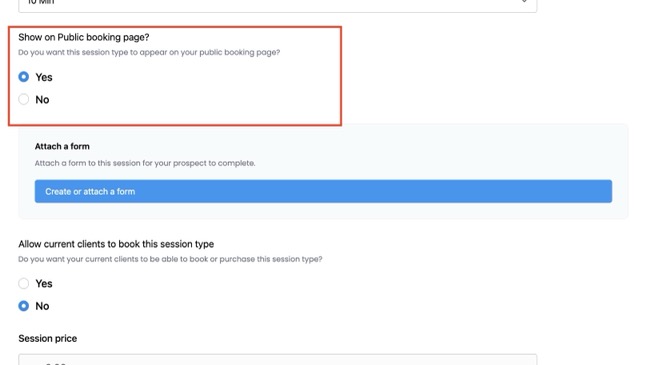
How do I set up my Public Booking Page?
Your Public Booking Page is a shareable link where new prospects can book sessions you choose to make public, no account required. Once it’s live, it works 24/7 to bring […]
Read More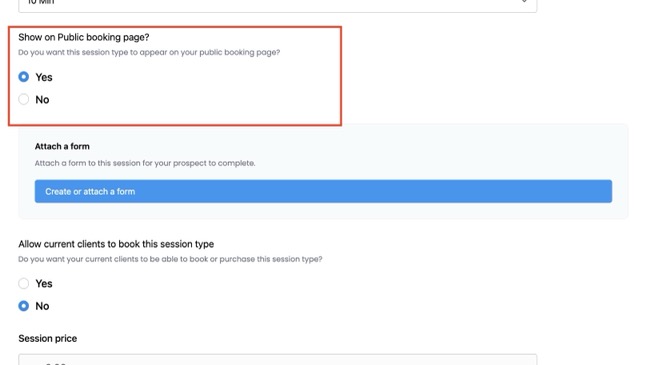
Why isn’t my session showing on my Public Booking Page?
If you’ve created a session but don’t see it on your Public Booking Page, it’s usually a settings issue. Here are the most common reasons and how to fix them. […]
Read MoreWhat is my Public Store?
Your Public Store is where all your Offers will show up. These can be free (to act as lead magnets or free initial consultations) or paid. Create your Offers in […]
Read MoreGetting Set Up on LCH Core: Video Tutorials to Run Your Coaching Business
Here you’ll find step-by-step video tutorials to help you get the most out of your coaching software. Whether you’re setting up your first welcome package, organizing client notes, or creating […]
Read MoreWhat tools are available for delivering my courses?
You have access to the same great range of coaching tools in your courses as you do for individual coaching. Assign a variety of these tools to create a value-added, […]
Read MoreHow do I create course content?
1. Click on Course Creator under Offers 2. Decide what kind of course you want: 3. Upload videos, create rich text with images and links, upload files. 4. Integrate some Course […]
Read MoreWhy should I offer courses?
Courses are a great way to offer your coaching services. You can use them to facilitate Group Coaching, allowing you to offer your services to a greater group of people, […]
Read MoreWhat Coaching Forms and Tools are available for coaching my clients?
Our online coaching software offers a wide variety of tools and forms to maximize your time, profits and enjoyment in running your coaching business. These help you to be more […]
Read MoreWhy should I use Coaching Plans with my clients?
When you’re coaching your clients, you want to set goals, keep your client focused, demonstrate the power of coaching, and track progress. Using coaching plans with your clients help you to do […]
Read MoreWhat is a welcome package?
Welcome your clients to coaching with your welcome package, which will be sent out automatically after a client purchases coaching with you, if you select this step during Onboarding. Your […]
Read MoreHow do I onboard my clients?
When you first invite a client, you’ll see their folder in your Client Management tab with the blue button Welcome your Client. Give each client a personalized welcome treatment easily […]
Read MoreNew coaches: Apply to the LCH Startup Program
Are you a new coach? Apply to our LCH Startup Program, and if eligible, you’ll get 50% off our Master Coach Plan for three full years! Apply here: LCH Startup […]
Read MoreHow do I set up my Public Store?
To set up your Public Store, just click on My Store in the side menu. Here you will see three links. If you already have a website, you can add a […]
Read MoreHow do I get paid?
Head on over to the Receive Payments tab of Settings. We partner with both Stripe and PayPal so that you can get paid easily and hassle free from your clients. […]
Read MoreHow do I read and respond to coaching tools I have assigned to courses?
If you have assigned coaching tools to complement your courses, you can view your course members’ responses in your Progress Stream, on the Courses tab. Read more about each coaching […]
Read MoreHow do courses on Life Coach Hub work?
It’s easy to expand your repertoire and offer Group Coaching, Instant or Drip Courses or Training. Courses allow you to coach more people at one time. They also let you automate your coaching, […]
Read More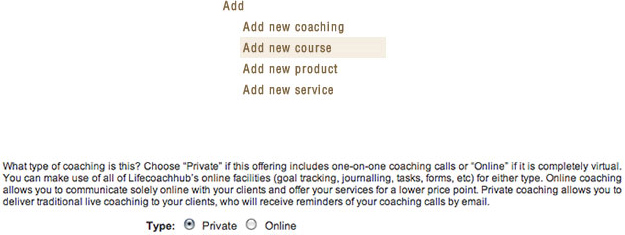
How do I conduct coaching online?
Online coaching is similar to coaching with live interaction, except everything is done online. So instead of making appointments to talk to your clients, you set up a regularly scheduled day when […]
Read MoreCan I edit or create my own coaching forms and tools?
Absolutely. You have complete customization over all your coaching forms and coaching tools. The best part is these are all saved, so you can reassign them to different clients or […]
Read MoreHow do I use Coaching Plans and Coaching Notes with my coaching clients?
Using Coaching Plans and Coaching Notes with your clients is easy. Just follow these simple steps. Note: Make sure you put Life Coach Hub on your Safe Sender email list so that you are sure to […]
Read MoreHow do I send out a welcome package and agreement to my clients?
When you onboard your client, you can choose whether or not to send out a welcome package. If you choose to do so, your welcome package, including your coaching agreement, will […]
Read MoreHow do I create appointments with my clients?
Tutorial video To make appointments, you’ll want to make sure you have at least one Session type created. Create the Session types you offer under Offers in the main menu […]
Read MoreHow do free initial coaching appointments work?
You can offer a free discovery session (“Free Initial Consultation”) in two ways. Both are created from the same session form, and a single session can appear in both places. […]
Read MoreWhy should I use homework and action items in my courses?
Setting assignments for your course members to complete is a great way to keep them engaged in your course and getting as much out of it as possible. Help your […]
Read MoreHow do I use homework and action items with my course members?
It’s easy to get your course members to follow through on their action steps. All you need to do is create an action item and assign it to your course. […]
Read More
How do I customize my welcome package and agreement?
A Welcome Package is a great way to welcome your clients. We’ll send it out automatically for you, so you don’t have to. But if you want, you can also […]
Read MoreHow does invoicing and billing work?
You have a number of options regarding how you get paid for your coaching sessions. You’ll see these show up when you go to book a session. Payment in advance […]
Read MoreHow do I get new clients?
There are lots of great ways to market yourself on Life Coach Hub to attract more clients, reach a wider audience. 1. Make sure you have created a directory listing You […]
Read MoreCan I offer a freebie or lead magnet to gather client leads onto a mailing list?
Of course! Great job on thinking about the entire funnel when it comes to finding clients. Your freebie/lead magnet will be a great way to build trust and nurture an […]
Read MoreHow does LCH Core software help me keep and grow my clients?
Our coaching software is the perfect complement to your marketing efforts. Here are all the ways this happens: 1. Get leads through the Public Booking Page Your Public Booking Page […]
Read MoreHow does LCH Core coaching software save me time and hassle?
Coach using LCH coaching software to cut down on your administrative hassles and win back time. Save time, energy, resources and money. LCH coaching software allows you to spend more time […]
Read MoreHow do I get listed in the coaching directory?
Start getting new clients by creating a directory listing. Your profile in the directory is the best way to get known and start attracting clients. Instructions for creating your profile […]
Read MoreHow does LCH Core coaching software help me expand my business?
LCH coaching software helps you expand your business by offering a wider range of services and information products. We also help you get new referrals and clients. You’ll free up loads […]
Read MoreHow do I set aside available blocks of time when I am free to see existing and new clients?
Available blocks of time are times that you have set aside when you are free to see clients. Great job! Now both your clients and your prospects can book times […]
Read MoreHow does coaching using LCH Core coaching software create added value for my clients?
Coaching using the Life Coach Hub coaching administration app allows you to create added value for your clients in a number of pivotal ways, allowing you to retain clients longer, […]
Read MoreHow much does it cost to get listed in the coaching directory?
It’s free to get listed in our coaching directory! Sign up and create your profile now in order to start gaining reputation and rankings on the site. After you create […]
Read MoreWhy should I use goals in my courses?
Goals are a great way to get your course members fired up about achieving success, and motivated towards pursuing their aims. In group coaching, set goals much as you would […]
Read MoreWhat are course modules and lessons?
Modules are like sections for your course. You will organize your content around topic areas, called modules. Inside each module you can have one or more lessons. Inside each module […]
Read MoreAre all my coaching forms and tools saved?
All your coaching forms and tools are saved on our secure servers, so you can reassign them to different clients or courses and win back lots of time. Here is a video […]
Read MoreHow do I customize my Coaching Plans?
You can easily customize the Coaching plans you use. You can also create your own Coaching plan by clicking the blue Create button. Note: Make sure you put Life Coach Hub on […]
Read MoreHow do I cancel or change an appointment?
You can change or cancel any coaching session you make. Changing a session Cancelling a session If you cancel or change an appointment, your client will receive an immediate email […]
Read MoreHow do I use goals with my course members?
Goal tracking is easy in your courses. If you want to set a goal for your course, all you need to do is create a goal and assign it to […]
Read MoreHow do I keep track of my client data, session notes, and progress?
Our coaching software offers a secure, private, and endlessly accessible way to store confidential client data, and track a client’s progress over time. In your Client Management page, there’s a […]
Read MoreWhere will my profile appear in the directory?
Your profile will be listed in the directory according to a number of factors: the number of your coaching hours, the number of your reviews, and if you have activated […]
Read MoreHow do I invite my clients to coach with me, and schedule sessions with them?
You can easily invite other people to coach with you. A. Use the Invite button Just click the large Blue Invite button at the top right corner of every page. […]
Read MoreWhy should I use journaling in my courses?
Journaling allows you to assign thought-provoking topics for your course members to write about. Journaling has been shown to be effective in a number of regards, including providing focus, improving […]
Read More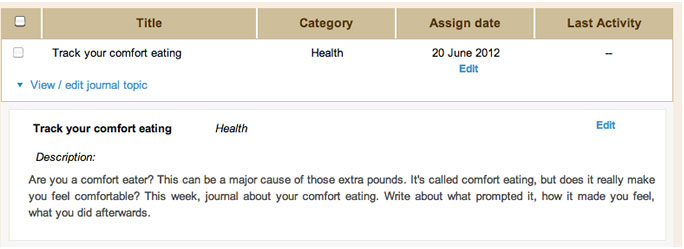
How do I use journaling with my course members?
It’s easy to pass the benefits of journaling on to your course members in a way that is simple for you to administer and respond to. To use journaling with your course […]
Read MoreHow can I take and send Coaching Notes?
Note: Make sure you put Life Coach Hub on your Safe Sender email list so that you are sure to receive important emails.
Read MoreWhat do I get with my free trial and how do I make the most of it?
Your free trial of LCH Core is your chance to experience what it’s like to have your entire coaching business run smoothly—without all the admin stress. Here’s what you’ll love: […]
Read MoreWhy should I use worksheets and forms in my courses?
You can use worksheets in your courses to take a reading of where your course members are at, and unearth areas for growth and change. Similar to working with someone […]
Read More
How do I create module and lesson content?
After creating a course, it’s easy to create your modules and lessons. Modules are like sections in which you can offer a number of lessons. When scheduling, you’ll be able […]
Read MoreHow will I know when my clients have responded to my journal topic, worksheet, or other coaching tool?
You’ll be alerted by email when your client responds or comments. Here is a video all about how to best use Coaching Tools in your business: Note: Make sure you […]
Read MoreCan I assign coaching forms and tools to specific clients?
Yes. Your clients will only be able to view and access the coaching tools, such as journal topics, goals, homework and action items, worksheets, resources and feedback surveys, which have […]
Read MoreHow do I use worksheets and forms with my course members?
You can easily create your own personalized worksheets and forms which you can assign to courses. Your course members will be able to post answers to your worksheets. Creating assessments […]
Read MoreI’m a new coach. Can I coach using LCH Core coaching software and list myself in the directory?
Yes! Life Coach Hub offers a turnkey system for launching a coaching business. This is the absolute perfect time to make use of LCH coaching software. You can start getting […]
Read MoreHow do I integrate with Zoom?
Login as a Coach First step is to login as a coach at https://app.lifecoachhub.com/login. Connect Zoom Account After logged in as a coach, you need to go to Settings > […]
Read MoreHow do I set up an installment plan or payment plan?
It’s simple to allow your clients to pay over time with your offers. This is fantastic for those larger ticket items that could be difficult for a client to pay […]
Read MoreHow do I give access to my existing clients to coach with me?
You can easily invite other people to coach with you. A. Inviting your clients if they will pay using the LCH system You can bill your clients securely through your […]
Read MoreHow do I send a summary of my session with my client?
After your sessions, it is easy to send a summary to your client. Your session notes will now be sent to your client! Note: Make sure you put Life Coach […]
Read MoreAre my client’s previous answers and progress reports archived?
Yes. All your client information is stored securely and completely accessible, so you can return and review where your client was a month, a year or five years ago! You […]
Read MoreHow does coaching using LCH Core coaching software work?
Using Life Coach Hub’s online coaching software, LCH Core, is easy and intuitive. The system you’ll use is rich with coaching tools and optimized for running a profitable and enjoyable […]
Read MoreInstall the Life Coch Hub WordPress plugin
We have a new WordPress plugin! If your website runs on WordPress (highly recommended), you can install this plugin to manage your coaching right from inside your website. Here is […]
Read MoreWhat if my client has no more prepaid sessions?
Sessions on LCH Core works a bit like a gym punch card: clients buy packages (a set number of prepaid sessions) or single sessions, and each time you meet, the […]
Read MoreWhat’s the difference between my Profile Listing, my Public Booking Page, and my Public Store?
On Life Coach Hub, you have three public places where prospects can discover you and connect with your services. Each one works differently, and together they give you multiple ways to attract […]
Read MoreHow do I add my business logo to my client’s Portal?
You can easily customize the colors and design your clients will see to suit your own brand. Navigate to the tab Receive Payment in Settings. Here you can add your […]
Read MoreHow do I link my existing website to LCH?
If you have an existing website, you’ll want to link to your Public Store. Just click on My Store Link under the My Store menu. Copy the URL, and paste […]
Read MoreHow do I send or view client invoices?
Invoices are sent automatically when a customer or client orders anything from your Public Store. This includes invoices for any coaching. In general, your clients will pay you in advance […]
Read MoreHow do I add coaching, courses, products and services to my Public Store?
To start selling your items to clients, you can create then easily from the Offers menu. Here you can find a number of products and services you can create and […]
Read MoreHow do I create a coaching package or single session I can sell to clients?
Take advantage of dynamic coaching tools such as journaling, action items, worksheets, goals, feedback surveys and coaching plans, as well as automatic administrative and scheduling functions. List coaching sessions as […]
Read MoreHow do I create a course that I can sell to clients?
As well as coaching, you can offer self-contained courses. These are a great way to deliver group coaching at a lower price point and reach more clients. Courses are also […]
Read MoreHow do I list a service?
Click on Offers in the main menu, and then choose Digital products and services. You can add new services here by clicking Add new. Fill in the information you would […]
Read MoreHow do I list a digital product?
Choose Offers from the main menu, and then Digital products & services. Here’s where you can add your new digital products. Fill in the information you would like prospective clients […]
Read MoreWhat services can I sell?
You can offer any kind of service. Some ideas are to sell tickets to live events and workshops, and to list your speaking fee. As confirmation of the service, upload […]
Read MoreWhat products can I sell?
Digital products You can sell anything that doesn’t require shipping. So feel free to upload mp3 recordings, e-books, and so on. These will help you earn a passive income while […]
Read MoreHow much does it cost to coach, train or sell on Life Coach Hub?
It’s free to join and get listed in the directory. You can activate one of our free plans, or upgrade to a pro plan to use our coaching software, all of which […]
Read MoreWhat do I need in order to I coach, train or sell on Life Coach Hub?
It’s very easy to get set up on Life Coach Hub. You just need to complete our simple set-up steps: Now you’re ready to coach, train or sell on Life […]
Read More
How do I use resources in my courses?
You may have additional information you want to pass onto your course members that isn’t included in any of your lessons text, video or audio files. You can do this […]
Read More
How do I provide access details for coaching calls to my course members?
There are a variety of services such as Zoom that will allow you to make coaching calls or meetings available to a group of people for your group coaching. Convey […]
Read More
How do I edit my course schedule?
Click on Course Creator, and then click on the Course schedule tab. Change the dates (for manual schedule) or interval (for automatic scheduling).
Read More
How do I create a course schedule?
After you add your Modules and Lessons, as well as the content you’ll be creating and uploading, the next step is the schedule. For an Instant course, there will not […]
Read MoreWhat are Instant and Drip courses?
A great way to free up time while passing on your coaching knowledge is to create courses. This allows you to create coaching content ahead of time, which is then […]
Read MoreWhy should I use feedback surveys in my coaching?
Gather immediate feedback on what is working and what needs improvement in your coaching so you can adjust accordingly, and keep your client on the path to success. You can […]
Read MoreHow do I create resources for my coaching clients?
You may have additional information you want to pass onto your clients. You can do this easily from your dashboard. Collect and keep track of the extra resources you send […]
Read MoreHow do I use coaching worksheets, assessments and forms with my coaching clients?
You can easily create your own personalized worksheets, assessments and forms which you can assign to clients. Your client will be able to post answers to your worksheets, and you will […]
Read MoreWhy should I use coaching worksheets, assessments and forms in my coaching?
Gather information about where your clients are and where they would like to be. Worksheets and assessments take a reading of the current terrain—where your clients are at right now. […]
Read MoreWhy should I use journaling in my coaching?
Journaling allows you to assign thought-provoking topics for your clients to write about. Journaling has been shown to be effective in a number of regards, including providing focus, improving health, […]
Read MoreHow do I use journaling with my coaching clients?
It’s easy to pass the benefits of journaling on to your clients in a way that is easy for you to administer and respond to. To use journaling with your clients, all […]
Read MoreWhy should I use action items in my coaching?
The key benefit of coaching is in helping clients to create new strategies, behaviors and perspectives. Asking your client to take action is critical in this process, and setting action […]
Read MoreHow do I use action items with my coaching clients?
It’s easy to get your clients to follow through on their action steps. Either you or your client can create action items, based on your coaching conversations. These pinpoint the areas […]
Read MoreHow do I use goals with my coaching clients?
Goal tracking is so important in keeping clients engaged in coaching, and seeing the true ROI. Your client can post progress reports, making it easy for you to be an […]
Read MoreWhy should I use goals in my coaching?
Coaching is all about helping your clients close the gap between where they are and where they want to be. Setting goals and charting progress toward these goals is crucial […]
Read MoreWhy should I offer group coaching?
Group coaching is a terrific way to expand your repertoire and reach more clients. You can coach more people for a lower price point with group coaching, making it an […]
Read More
How do I offer group coaching?
Group coaching works in a similar way to regular coaching, except instead of offering private coaching calls, you can either offer group coaching calls, or eliminate live interaction in favor of […]
Read MoreWhy should I offer online coaching?
Online coaching is growing market. Offering online coaching opens up your repertoire and is appealing to a demographic who wants accountability and motivation but prefers an online engagement style. Online […]
Read MoreHow do I deliver coaching content to my clients automatically?
You can easily deliver coaching content to your clients automatically. Just create an Instant or Drip Course which allows you to create electronic coaching content ahead of time, which is […]
Read MoreWhy isn’t the Submit Plan button showing for my client?
The Submit Your Plan button should always show up under your clients’ coaching plans. There are two conditions under which they don’t: Note: Make sure you put Life Coach Hub […]
Read MoreWhere do I view forms from my welcome package?
The forms in your coaching welcome package will make up your client’s Coaching Portrait. It’s easily accessible on the Settings page of their fin your client’s folder in Client Management. This makes […]
Read MoreHow can I share my schedule with clients so they can make their own appointments?
Logged in clients will be able to see your availability and book sessions with you. Just make sure to create your Available Time slots in the Available Time tab of […]
Read MoreHow do I let my clients know how to contact me?
Bookings you make yourself Each session you make with a client, you will be able to select whether it is by phone, in person, on Zoom, on Google Meet, or […]
Read MoreHow will I know if my client has cancelled an appointment?
If your client cancels your appointment, you’ll receive an immediate email alert. Note: Make sure you put Life Coach Hub on your Safe Sender email list so that you are sure to […]
Read MoreCan prospective clients and those interested in knowing more about me schedule appointments?
Yes. You can let people who aren’t clients yet book with you in two ways: 1) Public Booking Page — instant, no account required 2) Public Store — appears with […]
Read MoreHow do I schedule my online coaching?
Online coaching does not involve live interaction, so you the best idea is to schedule sessions that will not be live, but instead over email or chat. You can do […]
Read MoreHow do I let prospective clients know that I am available for a free initial consultation?
Offering an initial free consultation is a fantastic way to attract new clients by demonstrating both your value and the value of coaching. With LCH Core, setting this up takes […]
Read MoreWhat is the Progress Stream?
The Progress Stream is a page where you can view all your sessions, coaching notes and coaching tools in one place. Think of it like your Facebook News Feed. You’ll […]
Read More
How do I deactivate a client?
Deactivating a client manually is very simple. Note: Make sure you put Life Coach Hub on your Safe Sender email list so that you are sure to receive important emails.
Read MoreHow do I coach clients using Life Coach Hub Core coaching software?
Coaching is enjoyable and easy using your dashboard’s coaching tools and features. These Support pages will guide you through the main features of the system so you can get started […]
Read MoreHow do I keep clients for longer?
Life Coach Hub offers the most interactive coaching administration sysem. You can: Sometimes in coaching, clients drop off because they don’t see progress in what they are achieving. Interactive features […]
Read MoreHow does Life Coach Hub increase my reputation as a coach?
Use Life Coach Hub to build up a solid reputation in your niche by helping you display verified coaching hours. Private coaching, online coaching, group coaching and courses all add to […]
Read MoreHow do I earn coaching hours to show up on my profile?
The more coaching hours you have, the higher up you’ll appear in the directory. This is because clients are looking for coaches who can prove their expertise, and by coaching […]
Read More
How do I submit an article or guest post?
We accept high quality, human written articles as guest posts in our blog. We are looking for subjects and writing that will interest readers. We’re not interested in just a […]
Read MoreHow do I start getting reviews for my profile?
Just give your current and past clients your profile URL and ask them to leave you a review. It will only take a minute, and will seriously boost your profile, […]
Read MoreWhat are coaching requests and client leads?
One of the issues faced by many coaches is that it’s hard to keep their practice full with a steady stream of clients. Signing up to get coaching request alerts […]
Read MoreI am already coaching. What can LCH Core coaching software offer me?
LCH coaching software offers a fantastic way to get more out of your coaching, work fewer hours, make more money, and deliver a higher quality service to your clients. Cut […]
Read MoreCan I coach my pre-existing clients using LCH Core coaching software?
Yes, absolutely. Just click the blue Invite button at the top of your screen. Once your clients are onboarded, you can start administering their coaching using the tools in your […]
Read More
What happens if someone contacts me?
If someone contacts you directly from your profile page, you’ll receive an email from us via email. This email will come from: If you have a paid plan (either LCH […]
Read MoreHow do I get started coaching?
Here is a video walkthrough: Next, take a look at: Note: Make sure you put Life Coach Hub on your Safe Sender email list so that you are sure to […]
Read MoreHow do I get started delivering courses?
Create a course to offer Group Coaching, automatic Instant or Drip Content Delivery modules, or live courses. Read more about how to get started coaching here. You can also watch this […]
Read MoreWhat is a bundle and how do I use the to grow my business?
Bundles are one of the most powerful ways to package your offers inside LCH Core.They let you combine sessions, courses, and digital products into a single irresistible package—so you can […]
Read MoreHow do I submit coaching hours to show up on my profile?
The more coaching hours you have, the higher up you’ll appear in the directory. This is because clients are looking for coaches who can prove their expertise, and by coaching […]
Read MoreAre my clients reminded of appointments and other tasks in their own time zone?
Yes, you see all times and dates in your own time zone, set automatically when you register. You can edit this on your Settings page. Your client will see all […]
Read MoreWhat appointments can a client see in their calendar? Will they see all of my appointments?
Your client can only see their own appointments in their calendar. Note: Make sure you put Life Coach Hub on your Safe Sender email list so that you are sure to receive […]
Read More
How do I stop emails going into spam?
Great question! To make sure you get every email from us, please follow these instructions on how to whitelist an email address. Use this for every separate email address from […]
Read MoreHow do I create a sliding-scale or discounted offer?
There are two quick ways to offer a reduced or customized price in LCH Core, without changing your public pricing. Option 1: Duplicate the package and make it Unlisted Best […]
Read MoreCan I gift an offer?
Yes! You can give away any offer to any current client. Just click on the blue Gift an offer button at the top of the Offers and Clients pages. Then […]
Read MoreHow do I submit a bug report?
Just click on the Live Chat icon on the bottom right, then click on Report an issue. After that, select Record screen. You can talk while you record your video. […]
Read MoreHow do I fix video upload issues?
Sometimes video uploads fail if your internet connection is too slow or unstable. Here are a few steps that usually solve the problem: 1. Check Your Internet Connection 2. Reduce […]
Read More