


Talk to a coach about Organizational coaching

Crystal Faulk
ACC
I help overwhelmed women in transition gain clarity, confidence, and...

Terrie Hein
Certified Life Coach, Certified Insight Coach Practitioner
Coaching to declutter your life, organize your goals, and cook...

Dr Charlene Ashley
Doctorate - Behaviours
I coach individuals to design fulfilling lives through structure, clarity,...

Paloma Chiara

Lana's Gymnastics Club
"Where the best in gymnastics meets fun. Where every child is a star"
lgclubny.com

Anna Sosnina
ICF (ACC)
ICF ACC certified coach, founder of EssorVie Coaching, passionate about...

Tyler Fink
B.A. in Religion, Anthropology, and Philosophy. Master of Divinity (M.Div.) in Missiology
Pastor, husband, and father helping Christian men pursue faithful growth...

Travis Brown
Professional Life coach
With experience in guiding clients to achieve goals, build confidence,...



Inbox-and-Outbox Paper Flow Setup for Stylish Desks
Are you all about style, decor and organization? Download a copy of our Clutter Reset Guide.
*****
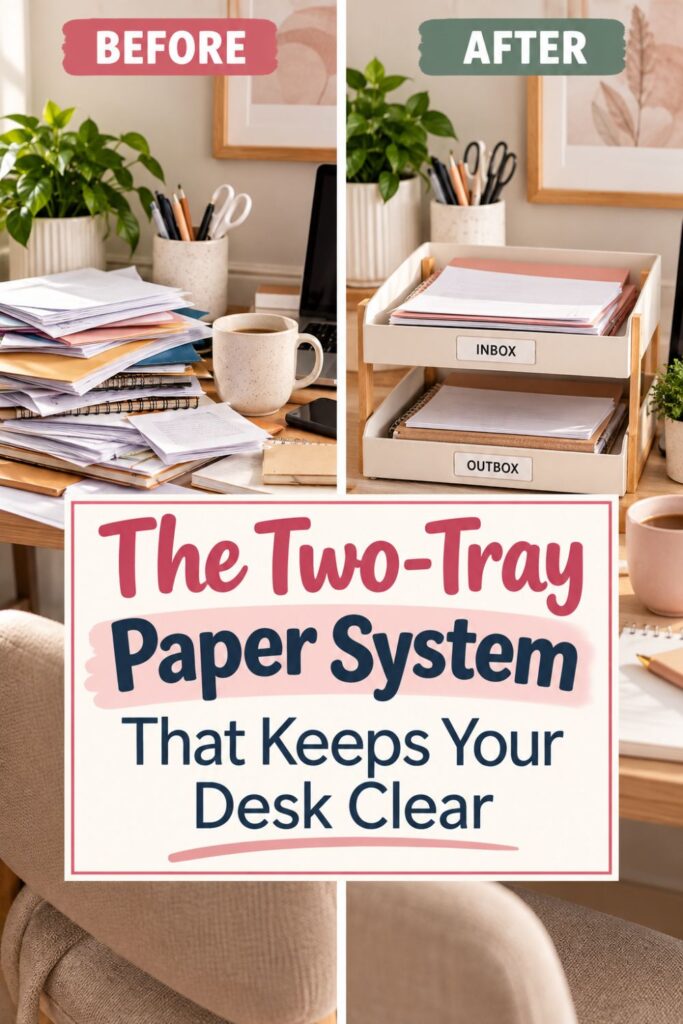
A tidy desk can look perfect in the morning and be covered in paper by lunchtime. Mail arrives, notes get scribbled during calls, receipts appear from bags, and forms land beside the keyboard because they need attention later.
The problem is often not that you own too much paper. The problem is that papers at completely different stages of your workflow are all competing for the same flat surface.
One note may need a reply. Another document needs to be signed. A receipt needs to be entered into your records. A completed form simply needs to be mailed. When all of those things sit in one pile, you have to mentally reprocess the entire stack every time you look at it.
A simple inbox-and-outbox paper system gives those papers somewhere to go.
The idea is straightforward:
- The inbox holds papers that have entered your workspace and still need some kind of action.
- The outbox holds papers you have already dealt with that are waiting to leave your workspace.
- Permanent records go somewhere else entirely.
This setup works especially well on a small or stylish desk because it does not require a complicated filing station. You are creating two temporary zones that help paper keep moving.
If you want to get more from your life, and are looking for concrete action steps to get you there, check out our Request a Coach page. It’s a “cut the fence-sitting and take action” way to tackle your issues and actually find success. To get off the fence and start to take action, click or tap here.
The goal is not to organize every document the second it touches your desk. Instead, you are creating an environment where the easiest action is putting the paper in the correct place.
That distinction matters.
If every paper requires an immediate decision, you will eventually start stacking things wherever there is room. If incoming papers have one obvious landing place, you can capture them quickly and process them when you are ready.
The result is a desk that feels calmer without requiring constant tidying. You are not relying on yourself to remember what every paper means. The system carries some of that mental load for you.
Need some in depth help with organization and productivity ? Drop on by our directories choc full of productivity coaches, minimalist coaches, and work/life balance coaches to get your life organized! Or click here to have us match you to the best.
1. Decide Exactly What Inbox and Outbox Mean
Before buying trays or choosing matching desktop organizers, decide what each zone will actually do.
The biggest mistake with paper organizers is using them as vague storage. A tray labeled “papers” may look neat for a few days, but it eventually becomes another pile because there is no rule telling you what belongs there.
Your inbox needs one clear purpose.
If you want to get more from your life, and are looking for concrete action steps to get you there, check out our Request a Coach page. It’s a “cut the fence-sitting and take action” way to tackle your issues and actually find success. To get off the fence and start to take action, click or tap here.
Define your inbox: Use it for paper that has entered your workspace but still requires a decision, action, or next step.
That could include:
- Mail you need to open
- Documents you need to review
- Forms you need to complete
- Receipts you need to record
- Notes you need to transfer
- Papers you need to scan
- Items that require a phone call or reply
Your outbox has a different job.
Define your outbox: Use it only for papers you have already acted on that are waiting to leave your desk.
Examples might include:
- A signed form waiting to be returned
- An envelope ready to mail
- Documents you need to take to work
- School paperwork ready to go into a backpack
- Papers waiting to be handed to someone
- Receipts that need to be delivered to a bookkeeper
A useful test is to ask, “Does something still need to happen to this?”
If the answer is yes, the paper usually belongs in the inbox. If your part is finished and the document simply needs to move somewhere else, it belongs in the outbox.
Keep permanent storage separate: Do not use either tray for papers you intend to keep long term.
If you want to get more from your life, and are looking for concrete action steps to get you there, check out our Request a Coach page. It’s a “cut the fence-sitting and take action” way to tackle your issues and actually find success. To get off the fence and start to take action, click or tap here.
Bank records, tax documents, warranties, reference material, contracts, and completed paperwork need a filing or archive system elsewhere.
This separation is what keeps the system moving. The inbox receives. You process. The outbox releases.
Once those roles are clear, every loose sheet has a much easier destination.
2. Map How Paper Actually Moves Across Your Desk
A paper system works best when it follows the way you already move through your day.
That means the prettiest location for your inbox may not be the most useful one. If you naturally drop mail beside your laptop, putting your inbox on a shelf across the room adds friction. Eventually, the papers will keep landing beside the laptop.
Find your natural arrival point: Pay attention to where paper already appears.
For a few days, notice where you tend to put:
- Mail when you walk into the room
- Receipts when you empty your bag
- Notes during phone calls
- Forms that arrive with children or coworkers
- Papers you print
- Documents you bring home from appointments
The goal is not to judge the habit. You are looking for information.
If you want to get more from your life, and are looking for concrete action steps to get you there, check out our Request a Coach page. It’s a “cut the fence-sitting and take action” way to tackle your issues and actually find success. To get off the fence and start to take action, click or tap here.
If most incoming paper lands on the left side of your desk, that is a strong clue that your inbox belongs somewhere nearby.
Find your natural departure point: Next, think about where finished papers go.
Perhaps outgoing mail needs to travel toward the front door. Maybe work documents need to go into a tote bag. School forms need to end up near backpacks. Business paperwork may eventually be scanned or handed to another person.
Place the outbox where that next movement makes sense.
Shorten the paper path: Try to reduce the number of steps required to use the system.
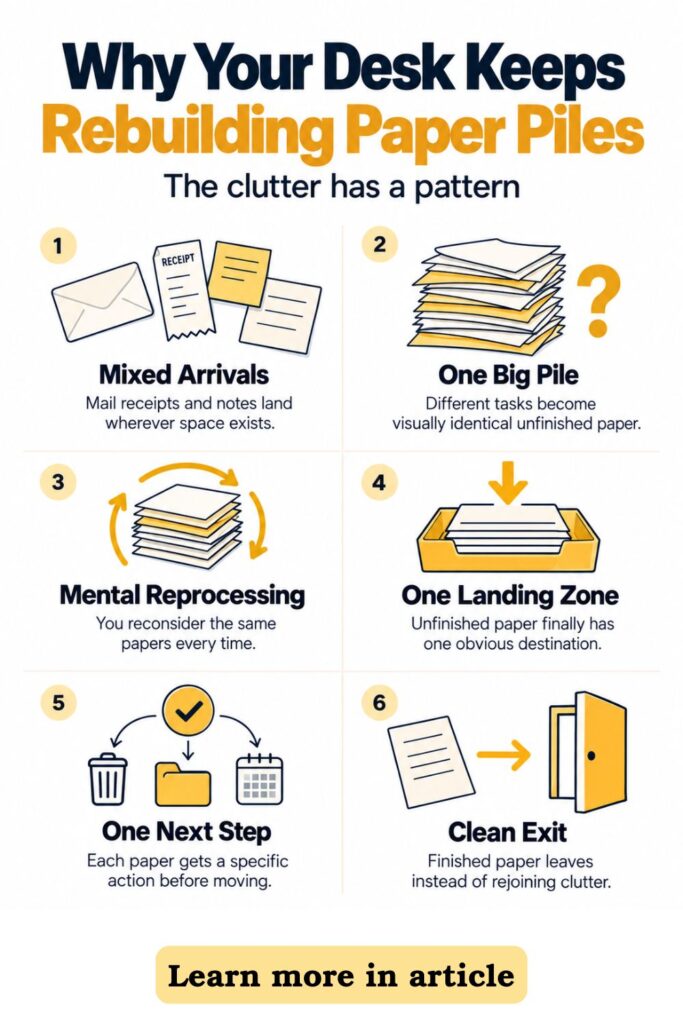
If putting away a single document requires standing up, opening a cabinet, moving a notebook, and finding a folder, the desk will probably win. The paper will remain on the surface.
Instead, make the intended behavior easier than creating a pile.
Your inbox should be close enough that dropping in a sheet takes almost no thought. Your outbox should be positioned where papers can naturally move toward their next destination.
If you want to get more from your life, and are looking for concrete action steps to get you there, check out our Request a Coach page. It’s a “cut the fence-sitting and take action” way to tackle your issues and actually find success. To get off the fence and start to take action, click or tap here.
This is environment design in its simplest form. You are not demanding better habits from yourself. You are adjusting the space so the useful habit requires less effort.
3. Choose a Two-Zone Setup That Fits the Desk
Once you know where the two zones need to go, choose containers that fit the available space.
You do not need a large office filing system. In fact, oversized organizers can create a new problem by taking up the very workspace you are trying to protect.
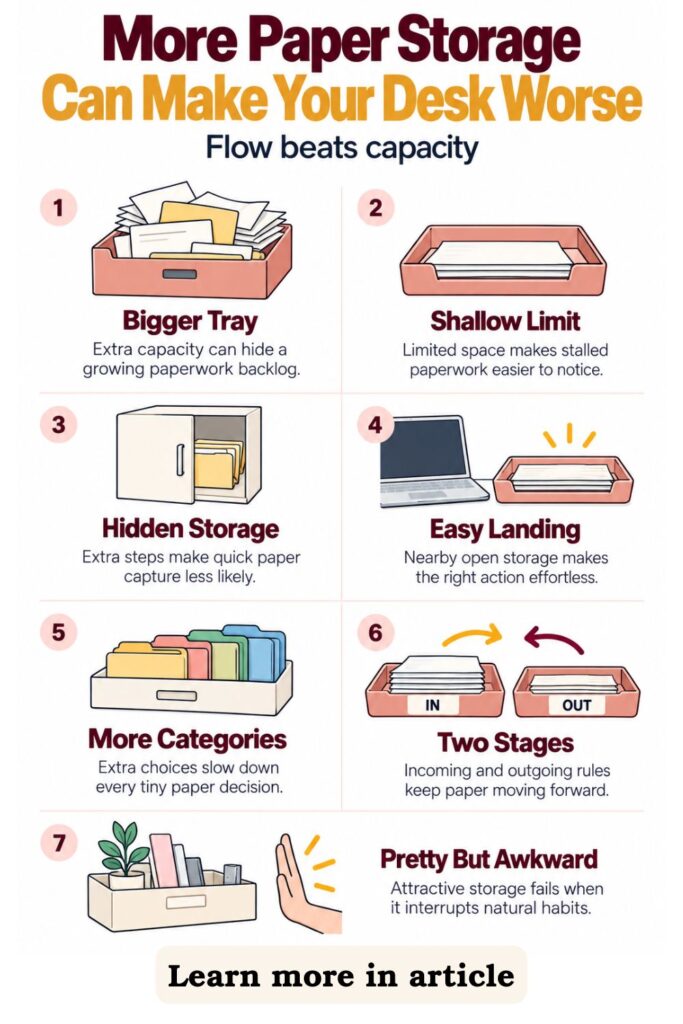
Choose the smallest container that works: Look for something large enough to hold standard paper but small enough to create a natural limit.
Good options include:
- Two shallow document trays
- A two-tier stackable paper tray
- Two slim magazine files
- A vertical file sorter
- Two narrow folders inside a desktop holder
- A small wall-mounted file system near the desk
For a compact workstation, vertical storage is often helpful. A stacked inbox and outbox can create two clear zones without taking up much horizontal space.
If you have a wider desk, side-by-side trays can make the distinction even more obvious.
Choose stacked or side-by-side zones: Think about what matters most in your space.
If you want to get more from your life, and are looking for concrete action steps to get you there, check out our Request a Coach page. It’s a “cut the fence-sitting and take action” way to tackle your issues and actually find success. To get off the fence and start to take action, click or tap here.
A stacked setup saves room, but labels need to be easy to see. Side-by-side trays use more surface area, but they make paper movement visually obvious.
There is no universal best option. The best design is the one you can understand at a glance.
Make the zones visually distinct: Use simple labels such as “In” and “Out,” or choose wording that feels more natural to you.
You might use:
- To Do / Done
- Incoming / Leaving
- Action / Return
- Process / Send
Avoid creating too many categories. The power of this system comes from having only two temporary stages.
Match the desk without overdecorating: If aesthetics matter to you, choose materials that already suit the workspace.
Acrylic trays can feel light and modern. Wood can add warmth. White or black organizers can disappear into a minimalist desk. Woven or soft-toned options can work in a more relaxed room.
The system should look intentional, but function comes first. If the organizer is beautiful but awkward to use, paper will eventually collect beside it.
If you want to get more from your life, and are looking for concrete action steps to get you there, check out our Request a Coach page. It’s a “cut the fence-sitting and take action” way to tackle your issues and actually find success. To get off the fence and start to take action, click or tap here.
4. Set Up the Inbox So Papers Stop Spreading
Your inbox should make capturing paper almost effortless.
Think of it as a landing zone, not a filing cabinet. Its job is to prevent loose sheets from spreading across the desk before you are ready to process them.
Make dropping paper easy: Keep the inbox open and accessible.
Avoid putting it:
- Behind your monitor
- Under books
- Inside a closed cabinet
- Beneath decorative objects
- Somewhere that requires you to rearrange other items first
You should be able to place a document into the inbox with one simple movement.
That ease matters because incoming paper often arrives while you are already doing something else. You may be in the middle of a phone call, unpacking a bag, or trying to begin work.
The inbox gives you permission to capture first and decide later.
Use the inbox as a temporary holding zone: Do not expect yourself to instantly process every paper.
If you want to get more from your life, and are looking for concrete action steps to get you there, check out our Request a Coach page. It’s a “cut the fence-sitting and take action” way to tackle your issues and actually find success. To get off the fence and start to take action, click or tap here.
When something arrives, put it in the inbox if it needs action. Then return to what you were doing.
This prevents the common pattern of stopping to deal with one paper, noticing another task, getting distracted, and leaving several unrelated documents spread across the surface.
Set a physical limit: A shallow tray is useful because it cannot hide an unlimited backlog.
If the inbox starts overflowing, that is information. It tells you the processing routine needs attention.
Buying a deeper tray may make the problem less visible, but it does not improve the flow.
Keep non-paper items out: Pens, charging cables, sticky notes, cosmetics, keys, and random desk supplies should have different homes.
Once unrelated objects begin filling the inbox, the meaning of the zone becomes less clear.
The ideal inbox contains only papers waiting for a decision or action.
If you want to get more from your life, and are looking for concrete action steps to get you there, check out our Request a Coach page. It’s a “cut the fence-sitting and take action” way to tackle your issues and actually find success. To get off the fence and start to take action, click or tap here.
That simplicity is what makes it useful. You can glance at the tray and know exactly what it represents without sorting through the contents mentally every time you see it.
5. Process the Inbox With a Simple Routing Rule
The inbox only helps if papers eventually move out of it.
You do not need an elaborate paperwork routine. You simply need a repeatable way to decide what happens next.
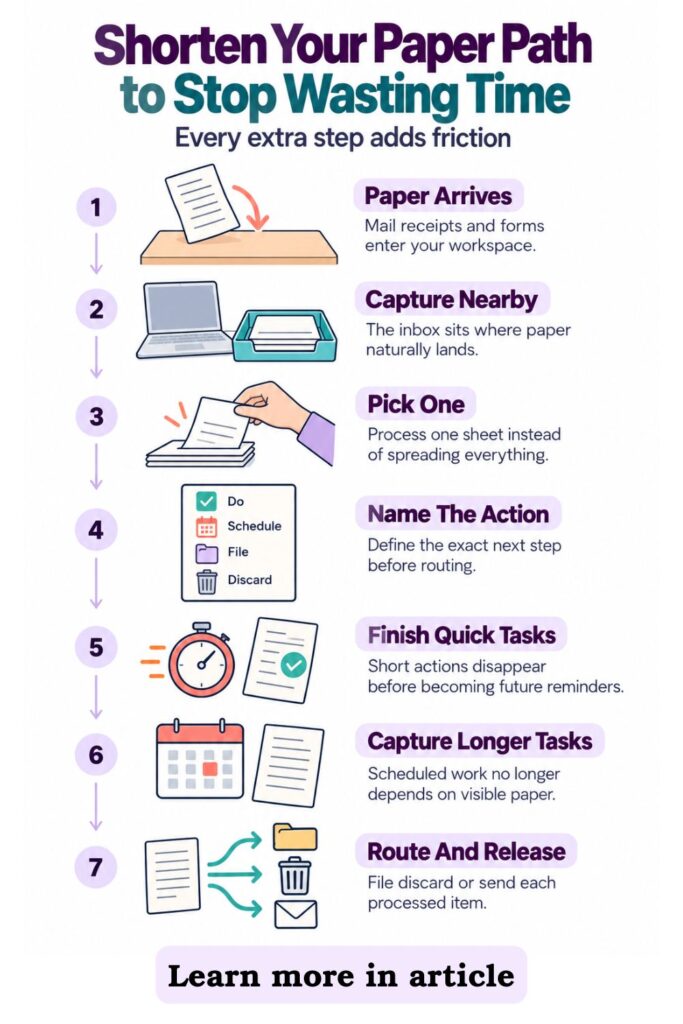
Start with one paper: Take the top item from the inbox and avoid spreading the entire stack across the desk.
Ask yourself what the paper actually requires.
The answer should be specific.
Instead of saying, “I need to deal with this,” identify the next action:
- Sign it
- Scan it
- Pay it
- Reply to it
- Enter the information
- Call someone
- File it
- Throw it away
- Give it to someone
- Mail it
Specific actions make decisions easier.
If you want to get more from your life, and are looking for concrete action steps to get you there, check out our Request a Coach page. It’s a “cut the fence-sitting and take action” way to tackle your issues and actually find success. To get off the fence and start to take action, click or tap here.
Complete very short actions immediately: If something genuinely takes only a minute or two, finishing it can be faster than creating another reminder.
Sign the form. Enter the receipt. Scan the page. Add the appointment to your calendar.
Once the action is complete, decide whether the paper belongs in permanent storage, recycling, shredding, or the outbox.
Capture longer actions somewhere reliable: Some papers represent tasks that cannot be finished during your paper-processing session.
Perhaps you need to gather information before completing a form or make a call during business hours.
Do not force the physical paper to act as your reminder.
Add the task to your planner, digital task manager, calendar, or another system you already trust. Then store the paper wherever it needs to wait.
Route every processed item: Try not to return a paper to the inbox unchanged.
If you want to get more from your life, and are looking for concrete action steps to get you there, check out our Request a Coach page. It’s a “cut the fence-sitting and take action” way to tackle your issues and actually find success. To get off the fence and start to take action, click or tap here.
After processing, it should move toward one of a few destinations:
- Outbox
- Filing
- Recycling
- Shredding
- Reference storage
- A defined waiting area
The goal is not to touch every paper only once. The goal is to avoid repeatedly rediscovering the same undecided paperwork.
A good routing rule turns the inbox from a pile into a queue. Papers arrive, receive a decision, and continue moving.
6. Use the Outbox as a Departure Zone, Not a Second Inbox
The outbox sounds simple, but this is where many two-zone systems quietly break down.
If the outbox starts holding papers that still need decisions, it becomes a second inbox. Soon you have two piles instead of one.
The outbox should contain papers that are finished from your perspective.
Move papers only when your action is complete: Use a clear standard.
A form you still need to fill out belongs in the inbox.
If you want to get more from your life, and are looking for concrete action steps to get you there, check out our Request a Coach page. It’s a “cut the fence-sitting and take action” way to tackle your issues and actually find success. To get off the fence and start to take action, click or tap here.
A completed form waiting to be mailed belongs in the outbox.
A document you still need to review belongs in the inbox.
A document you reviewed and need to take to tomorrow’s meeting belongs in the outbox.
This distinction keeps the system easy to understand.
Group by destination only when necessary: If your outbox regularly contains several types of finished paperwork, you can add a small amount of structure.
For example, use thin folders labeled:
- Take With Me
- Return
- Give To Someone
Keep the categories broad. Too many folders create extra decisions and defeat the simplicity of the two-zone setup.
Connect the outbox to a routine you already have: Decide when papers physically leave.
If you want to get more from your life, and are looking for concrete action steps to get you there, check out our Request a Coach page. It’s a “cut the fence-sitting and take action” way to tackle your issues and actually find success. To get off the fence and start to take action, click or tap here.
You might empty the outbox:
- When you pack your work bag
- Before leaving the house
- During your evening reset
- When checking outgoing mail
- Before the school run
- At the end of the workday
A useful outbox is connected to motion.
Watch for papers that linger: If one document remains there for a week, ask why.
Maybe you keep forgetting to take it with you. Perhaps the outbox is too far from the door. Maybe you are waiting for information and the paper actually belongs back in an action category.
Treat lingering items as clues.
The purpose of the outbox is not merely to make completed paper look tidy. It is to create a visible final stage that helps paperwork leave your workspace instead of drifting back onto the desk.
7. Add a Five-Minute Paper Reset to Your Workday
Even a well-designed system needs a small maintenance habit.
The good news is that maintaining two paper zones is much easier than repeatedly clearing an entire desk after clutter takes over.
If you want to get more from your life, and are looking for concrete action steps to get you there, check out our Request a Coach page. It’s a “cut the fence-sitting and take action” way to tackle your issues and actually find success. To get off the fence and start to take action, click or tap here.
A five-minute reset can be enough.
Choose a reliable cue: Attach the reset to something you already do regularly.
For example:
- Shutting down your computer
- Reviewing tomorrow’s calendar
- Finishing your afternoon coffee
- Packing your bag
- Clearing your desk before dinner
- Starting your morning planning routine
Using an existing cue makes the habit easier to remember.
Clear easy exits first: Begin with papers that require almost no thought.
Throw away scraps. Recycle junk mail. Shred sensitive documents. Move completed paperwork into the outbox.
These quick wins immediately reduce visual clutter.
Process the inbox for a few minutes: You do not necessarily need to reach inbox zero every day.
If you want to get more from your life, and are looking for concrete action steps to get you there, check out our Request a Coach page. It’s a “cut the fence-sitting and take action” way to tackle your issues and actually find success. To get off the fence and start to take action, click or tap here.
Instead, aim to keep the tray at a manageable level.
If the inbox contains five papers and you can process three, that may be enough to prevent the system from becoming overloaded.
For a busier office, you might prefer a longer paper-processing session once or twice a week while still doing a quick daily surface reset.
Return stray papers to one of the two zones: Look across the desk for sheets that escaped the system.
Ask whether each paper is incoming and unfinished or completed and waiting to leave.
Put it where it belongs.
End with open workspace: Your final step is simply restoring enough clear surface for the next work session.
That does not mean making the desk photograph-ready every evening. It means removing the visual noise created by loose paper.
If you want to get more from your life, and are looking for concrete action steps to get you there, check out our Request a Coach page. It’s a “cut the fence-sitting and take action” way to tackle your issues and actually find success. To get off the fence and start to take action, click or tap here.
A short reset is easier to maintain than a dramatic weekend declutter.
Over time, the routine teaches you to notice paper earlier. Instead of waiting until the desk disappears beneath several unrelated stacks, you keep paperwork moving in small, manageable batches.
8. Create Rules for the Papers That Usually Break the System
Simple systems often fail because a few awkward categories do not fit neatly into the basic rules.
Rather than abandoning the inbox-and-outbox method, create specific rules for those exceptions.
Handle papers waiting on someone else: These documents are tricky because your immediate action may be finished, but the matter itself is not complete.
For example, you may have sent a form and be waiting for approval, or you may need someone else to provide information before you can continue.
Do not leave the paper indefinitely in the outbox.
Instead, create a follow-up reminder in your calendar or task manager. If you need the physical document later, keep it in a clearly defined waiting folder.
If you want to get more from your life, and are looking for concrete action steps to get you there, check out our Request a Coach page. It’s a “cut the fence-sitting and take action” way to tackle your issues and actually find success. To get off the fence and start to take action, click or tap here.
Handle reference papers separately: Some papers contain useful information but require no action.
Examples might include instructions, schedules, policies, or records.
Once you know you want to keep them, move them into permanent reference storage. Leaving them in the inbox creates the false impression that something still needs to be done.
Give sentimental papers their own category: Keepsakes do not belong in an administrative workflow.
Cards, letters, drawings, photographs, and meaningful notes deserve a separate storage decision. If you are unsure whether to keep something, place it in a designated decision box rather than allowing it to stall the inbox.
Create a consistent route for recurring paperwork: Repeated items become easier when they always follow the same path.
Receipts might go from inbox to bookkeeping to recycling or storage.
School forms might go from inbox to completed form to outbox to backpack.
If you want to get more from your life, and are looking for concrete action steps to get you there, check out our Request a Coach page. It’s a “cut the fence-sitting and take action” way to tackle your issues and actually find success. To get off the fence and start to take action, click or tap here.
Business mail might go from inbox to action to scanning to filing.
The exact route matters less than consistency.
When common paper types follow predictable paths, you stop deciding from scratch every time they appear.
That is what makes the system feel structured without becoming complicated. The everyday papers move quickly, while unusual items have defined exceptions that prevent them from clogging the main flow.
What to Do When Your Inbox Keeps Overflowing
An overflowing inbox does not automatically mean the system failed.
Usually, it means one part of the workflow needs adjusting.
Before buying a larger tray, look for the bottleneck.
Check whether you are processing the inbox often enough: If paper enters every day but you only review it once a month, even a good setup will overflow.
If you want to get more from your life, and are looking for concrete action steps to get you there, check out our Request a Coach page. It’s a “cut the fence-sitting and take action” way to tackle your issues and actually find success. To get off the fence and start to take action, click or tap here.
Try a short daily session or two scheduled processing blocks each week.
Frequency matters more than marathon organizing sessions.
Check whether your next actions are too vague: Papers often remain stuck because the task attached to them has not been clearly defined.
“Deal with insurance paperwork” feels heavy.
“Call insurer to ask which form is required” is specific.
When a paper repeatedly gets skipped, ask what the very next physical action actually is.
Look for a missing destination: Sometimes the inbox is functioning perfectly, but papers have nowhere to go afterward.
You may need:
If you want to get more from your life, and are looking for concrete action steps to get you there, check out our Request a Coach page. It’s a “cut the fence-sitting and take action” way to tackle your issues and actually find success. To get off the fence and start to take action, click or tap here.
- A small filing box
- A shred bin
- A receipt envelope
- A scanning routine
- A school-paper folder
- A permanent reference file
If completed papers keep returning to the inbox, the next stage of the system may be missing.
Watch where papers land beside the tray: This is one of the most useful clues.
If you consistently put mail next to the inbox instead of inside it, the tray may be positioned awkwardly. Move it closer.
If papers keep collecting near your bag, perhaps the inbox should be there instead.
Do not make yourself perform unnecessary steps simply because the original setup looked good.
A successful organization system should adapt to your behavior.
When the inbox fills, treat the overflow as feedback. Identify what is slowing the flow, adjust the placement or routine, and make it easier for paper to continue moving.
How an Organization Coach Could Help Make the System Stick
A simple paper system does not require professional help, but an organization or productivity coach can be useful when the same clutter pattern keeps returning despite repeated attempts to fix it.
If you want to get more from your life, and are looking for concrete action steps to get you there, check out our Request a Coach page. It’s a “cut the fence-sitting and take action” way to tackle your issues and actually find success. To get off the fence and start to take action, click or tap here.
The most valuable help is often not choosing containers. It is identifying where the workflow breaks.
Identify the real friction point: One person may have no trouble collecting paper but struggle to make decisions about it. Another may process paperwork easily but forget to mail or return completed documents.
A coach can help separate those problems.
Questions might include:
- Where does paper first enter your routine?
- Which documents tend to sit the longest?
- What decisions do you repeatedly avoid?
- Which tasks depend on someone else?
- When do completed papers fail to leave?
- Which part of the process feels annoying or unclear?
These answers can reveal whether the issue is storage, task management, follow-through, or the physical setup.
Design the system around real life: A working parent may need separate routes for school papers and business paperwork. A solopreneur may need receipts, client notes, contracts, and mailing tasks to move through the same small workspace.
The basic inbox-and-outbox concept can stay simple while the surrounding routine reflects those realities.
Create realistic reset habits: A coach can also help choose maintenance routines that fit your schedule.
If you want to get more from your life, and are looking for concrete action steps to get you there, check out our Request a Coach page. It’s a “cut the fence-sitting and take action” way to tackle your issues and actually find success. To get off the fence and start to take action, click or tap here.
Someone who hates end-of-day organizing may do better with a morning reset. Another person may prefer two longer paper sessions each week.
The goal is not to copy someone else’s perfect routine.
Reduce complexity instead of adding more: Good support should make the system easier to use.
If you keep creating more trays, labels, folders, and categories but still feel buried in paper, simplifying may be more useful than expanding.
A two-zone setup works because it reduces decisions. Coaching can help preserve that simplicity while adapting the system to the way you actually work.
Keep Paper Moving and the Desk Stays Clear
The biggest benefit of an inbox-and-outbox system is not that it makes paper look prettier.
It gives paper a direction.
Instead of every document becoming a permanent resident of your desk, each sheet moves through a simple flow.
If you want to get more from your life, and are looking for concrete action steps to get you there, check out our Request a Coach page. It’s a “cut the fence-sitting and take action” way to tackle your issues and actually find success. To get off the fence and start to take action, click or tap here.
It arrives. You capture it. You decide what it needs. You take action. Then it either leaves, gets filed, or gets discarded.
Capture what comes in: Give unfinished paperwork one predictable landing place.
When mail, notes, receipts, forms, and printed documents arrive, you no longer need to decide exactly what to do with them in the moment. If action is still required, they go into the inbox.
Make one decision at a time: Process the stack gradually.
You do not need to solve every administrative task in one sitting. You simply need to identify the next step and move each document closer to completion.
Move finished paper toward the exit: Once your action is complete, stop letting the document blend back into unfinished work.
Put it into the outbox if it needs to leave your workspace. File it if it needs to stay. Recycle or shred it if it no longer has a purpose.
Maintain the flow instead of chasing perfection: A tidy desk does not require constant organizing.
If you want to get more from your life, and are looking for concrete action steps to get you there, check out our Request a Coach page. It’s a “cut the fence-sitting and take action” way to tackle your issues and actually find success. To get off the fence and start to take action, click or tap here.
It requires a system that makes paper easier to move than to pile.
A short reset, a clearly positioned inbox, and a useful outbox can eliminate much of the visual clutter that makes a workspace feel busy.
That leaves you with something more valuable than an attractive desk.
You gain a workspace where you can see what needs attention, know what is already handled, and start the day without yesterday’s paperwork competing for space.
Are you all about style, decor and organization? Download a copy of our Clutter Reset Guide.
Need some in depth help with organization and productivity ? Drop on by our directories choc full of productivity coaches, minimalist coaches, and work/life balance coaches to get your life organized! Or click here to have us match you to the best.

If you want to get more from your life, and are looking for concrete action steps to get you there, check out our Request a Coach page. It’s a “cut the fence-sitting and take action” way to tackle your issues and actually find success. To get off the fence and start to take action, click or tap here.
Read this next

The Secret Techniques Professional Artists Use on Painted Pumpkins
Are you all about style, decor and organization? Download a copy of our Decluttering Workbook. **** Carving pumpkins might be the tradition, but painted pumpkins have taken over as the […]
Read More
Why You Procrastinate and How To Stop It
Tips for how to really understand why you drag your feet and how to get you back in motion.
Read More
DIY Desk Organizer Ideas Using Things You Already Have
Are you all about style, decor and organization? Download a copy of our Clutter Reset Guide. ***** Use jars, boxes, trays, clips, and simple containers to create useful desk storage […]
Read More