


Talk to a coach about Organizational coaching

Crystal Faulk
ACC
I help overwhelmed women in transition gain clarity, confidence, and...

Terrie Hein
Certified Life Coach, Certified Insight Coach Practitioner
Coaching to declutter your life, organize your goals, and cook...

Dr Charlene Ashley
Doctorate - Behaviours
I coach individuals to design fulfilling lives through structure, clarity,...

Paloma Chiara

Lana's Gymnastics Club
"Where the best in gymnastics meets fun. Where every child is a star"
lgclubny.com

Anna Sosnina
ICF (ACC)
ICF ACC certified coach, founder of EssorVie Coaching, passionate about...

Tyler Fink
B.A. in Religion, Anthropology, and Philosophy. Master of Divinity (M.Div.) in Missiology
Pastor, husband, and father helping Christian men pursue faithful growth...

Travis Brown
Professional Life coach
With experience in guiding clients to achieve goals, build confidence,...




Small-Box Inbox System for Receipts, Notes, and To-Do Papers
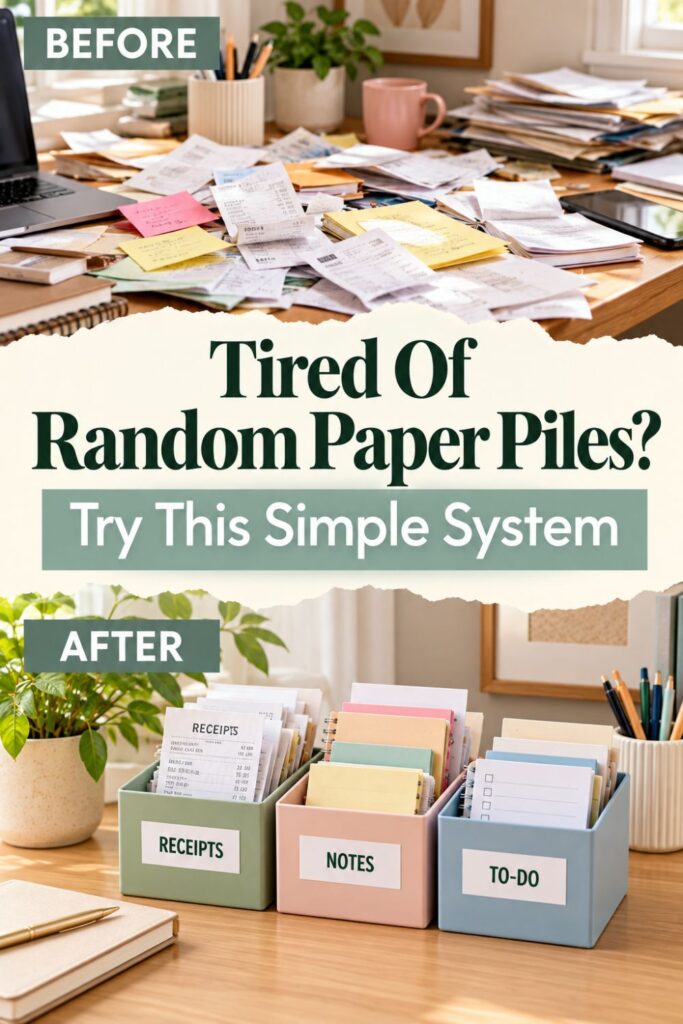
When Every Loose Paper Ends Up in the Same Desk Pile
Paper clutter rarely starts as a giant mess. It usually starts with one receipt you might need later, a handwritten reminder from a phone call, or a form you plan to fill out after lunch. Because none of those papers has an obvious place to go, they land wherever there is room.
Before long, the edge of your desk becomes temporary storage. Papers get tucked under notebooks, pushed behind the keyboard, or stacked with unrelated documents. The frustrating part is that some of those papers actually are important, so simply throwing everything away is not an option.
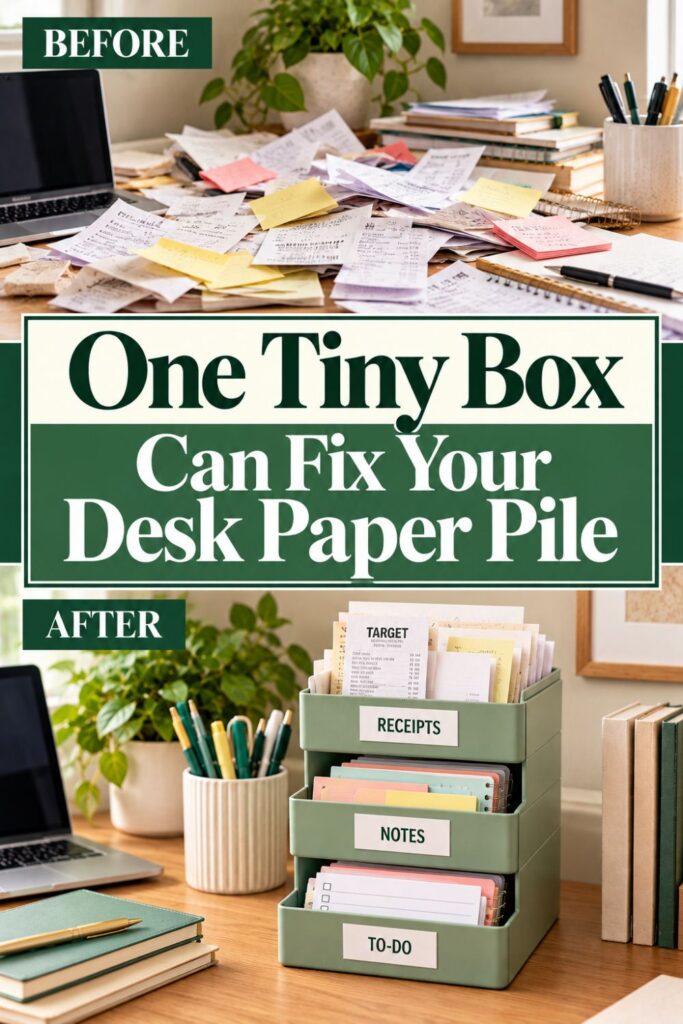
A small-box inbox system solves the problem by giving temporary papers a clear holding spot. You are not building an elaborate filing system or committing to a complicated organization routine. You are simply deciding where loose papers should wait until you are ready to deal with them.
The basic setup can be as simple as three small boxes:
- Receipts: Use this box for receipts you may need for returns, reimbursements, budgeting, taxes, or record keeping.
- Notes: Place handwritten reminders, phone notes, appointment details, ideas, and other scraps of information here.
- To Do: Use this box for papers that require an action, such as forms, bills, permission slips, or documents that need a response.
The important distinction is that these boxes are not permanent storage. They are temporary landing spots that stop papers from spreading across your work surface.
Start with the problem you already have: Look at the papers currently sitting on your desk and notice what types keep showing up.
Create one obvious destination for each type: When a new paper arrives, you should be able to decide where it belongs within a few seconds.
Once those tiny decisions become easier, keeping the desk clear becomes much less dependent on motivation. Instead of telling yourself you will organize the paper later, you immediately give it a temporary home.
If you want to get more from your life, and are looking for concrete action steps to get you there, check out our Request a Coach page. It’s a “cut the fence-sitting and take action” way to tackle your issues and actually find success. To get off the fence and start to take action, click or tap here.
That small shift is what makes the system useful.
1. Decide Which Papers Actually Need a Desk Inbox
Before choosing boxes, figure out which papers genuinely need to stay near your desk. One of the easiest ways to make an organization system too complicated is to create categories for every possible kind of document.
Start with what is already creating clutter.
Gather the loose papers currently sitting on your desk, nearby shelves, or work surface. Do not organize them yet. Simply put them together so you can see what you are dealing with.
You may notice several recurring types:
- Receipts
- Handwritten reminders
- Appointment cards
- Forms
- Bills
- Printouts
- Notes from calls or meetings
- Papers containing information you need to enter somewhere else
Now separate temporary papers from permanent records.
Identify papers that still require a decision: Keep anything you need to review, enter, respond to, photograph, complete, or otherwise process in the inbox system.
Move permanent records elsewhere: Papers that already belong in tax files, medical files, household records, or other long-term storage do not need to live on your desk.
If you want to get more from your life, and are looking for concrete action steps to get you there, check out our Request a Coach page. It’s a “cut the fence-sitting and take action” way to tackle your issues and actually find success. To get off the fence and start to take action, click or tap here.
This distinction matters because your inbox should represent unfinished paper, not every piece of paper you own.
Next, look for categories that repeat frequently. If receipts appear almost every day, they deserve their own container. If handwritten notes constantly accumulate beside your keyboard, that is another useful category.
Avoid creating boxes for paper types that almost never appear.
Build categories around real behavior: If you receive one warranty document every six months, it probably does not need its own desktop box.
Group similar actions together: A form, bill, and letter might all belong in the same To-Do box if each requires you to do something.
The goal is not perfect categorization. It is quick categorization.
Ideally, every loose paper that regularly lands on your desk should have an obvious temporary destination. If you have to stand there debating between six different categories every time a piece of paper arrives, the system has become harder than the pile it was supposed to replace.
Start with three categories. You can always adjust them after seeing how the system works in real life.
If you want to get more from your life, and are looking for concrete action steps to get you there, check out our Request a Coach page. It’s a “cut the fence-sitting and take action” way to tackle your issues and actually find success. To get off the fence and start to take action, click or tap here.
2. Choose the Smallest Boxes That Can Handle the Job
Once you know what needs containing, look for boxes you already have. This system does not require matching organizers, special office products, or a shopping trip.
Small cardboard boxes, sturdy packaging, shallow gift boxes, desktop trays, stationery boxes, or other open containers may work perfectly well. The exact container matters less than whether it makes dropping paper inside easy.
Choose containers that are easy to reach into: Open boxes usually work better than containers with lids because adding a paper should take almost no effort.
Match the box to the paper size: A small container works well for receipts and sticky notes, while full sheets may need a wider tray or box.
Try to keep the containers reasonably shallow. A deep box can hide a surprisingly large amount of paper, which makes it easier to ignore what is accumulating.
A shallow box creates a natural visual limit.
You also do not need three identical containers. In fact, different sizes can make the categories easier to recognize at a glance.
For example:
If you want to get more from your life, and are looking for concrete action steps to get you there, check out our Request a Coach page. It’s a “cut the fence-sitting and take action” way to tackle your issues and actually find success. To get off the fence and start to take action, click or tap here.
- A narrow box for receipts
- A medium box for notes and scraps
- A larger tray for full-size to-do papers
Use what fits your actual clutter: If most of your notes are tiny scraps, do not dedicate an entire letter-size tray to them.
Avoid oversized storage: A huge box can quietly turn into a long-term dumping ground instead of a temporary inbox.
The word “small” is important here.
Your container should hold enough paper to get you through normal daily life, but not enough to store three months of neglected paperwork. Limited space gives you a gentle signal that it is time to review what has accumulated.
Before placing anything permanently, test the boxes on your desk.
Can you reach them easily while seated? Do they take over too much of the work surface? Can you see what is inside without lifting them?
If the answer to those questions is yes, you probably have a workable setup.
The easiest organization systems often begin with containers you already own. You can always replace them later if you decide you want something prettier, sturdier, or more permanent.
If you want to get more from your life, and are looking for concrete action steps to get you there, check out our Request a Coach page. It’s a “cut the fence-sitting and take action” way to tackle your issues and actually find success. To get off the fence and start to take action, click or tap here.
First, make the system work.
3. Give Each Box One Clear Job
Now turn your random collection of containers into an actual paper system.
Each box needs one clear purpose. The label should answer a simple question: Why is this paper sitting on my desk?
A useful starting setup is Receipts, Notes, and To Do.
Receipts
Use this box for receipts that still have a reason to exist.
Keep receipts that need another step: Put receipts here if you need to enter them into bookkeeping software, submit them for reimbursement, keep them during a return window, or review them later.
Remove receipts once their job is finished: After the expense is recorded or the return period has passed, either file the receipt properly or discard it.
Notes
The Notes box is for information that has not yet reached its permanent destination.
If you want to get more from your life, and are looking for concrete action steps to get you there, check out our Request a Coach page. It’s a “cut the fence-sitting and take action” way to tackle your issues and actually find success. To get off the fence and start to take action, click or tap here.
That might include handwritten ideas, notes from phone calls, appointment details, names, measurements, reminders, or information scribbled on scrap paper.
Capture temporary information in one place: Instead of stuffing a note beneath your keyboard, put it into the Notes box.
Transfer useful information later: Add the appointment to your calendar, move the idea into your notes app, or record the phone number where it actually belongs.
To Do
The To-Do box contains paper that represents an unfinished action.
Examples might include:
- A bill to pay
- A form to complete
- A letter requiring a response
- A document to review
- A paper that needs someone else’s signature
- Something you need to mail
Sort according to the next action: A receipt requiring reimbursement could go in To Do rather than Receipts if reimbursement is the important next step.
Choose usefulness over perfect classification: The best category is the one that helps you remember what needs to happen next.
That last rule prevents overthinking.
If you want to get more from your life, and are looking for concrete action steps to get you there, check out our Request a Coach page. It’s a “cut the fence-sitting and take action” way to tackle your issues and actually find success. To get off the fence and start to take action, click or tap here.
Your boxes are not an archival system. They are a decision shortcut.
If every paper has one obvious next place, you remove the tiny hesitation that usually causes it to land on the desk instead.
4. Label the Boxes Without Turning It Into a Craft Project
Labels are helpful because they reduce decision-making. They stop being helpful when creating them becomes a whole separate organization project.
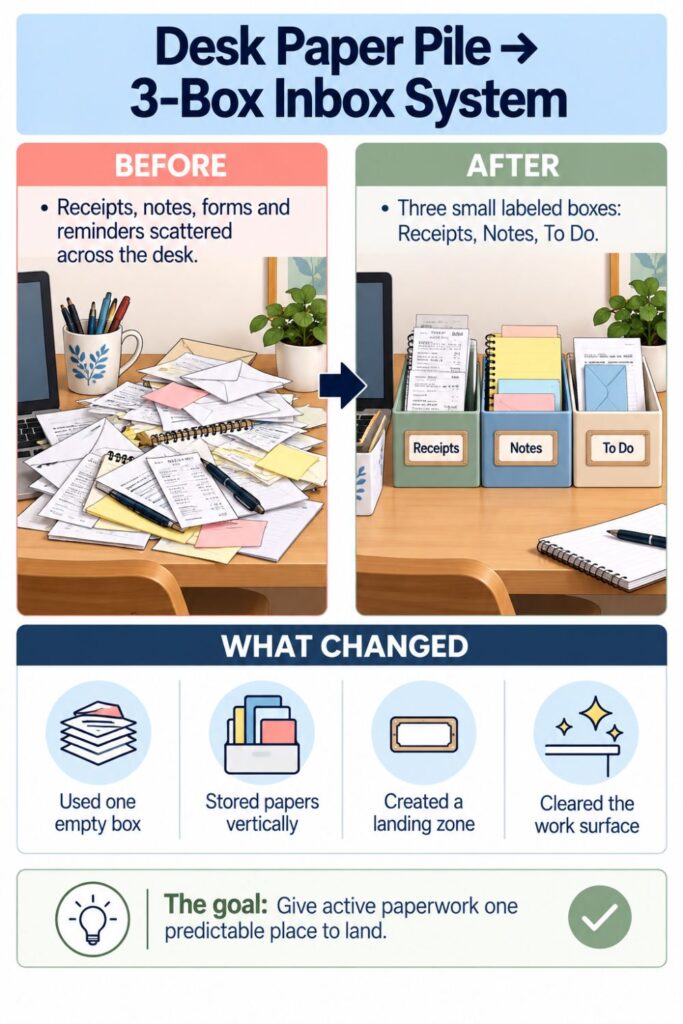
You do not need matching fonts, a cutting machine, laminated cards, or a label printer. A handwritten sticky note can do the job perfectly well.
Start with obvious words.
Use labels you understand instantly: “Receipts,” “Notes,” and “To Do” are better than vague labels such as “Important,” “Later,” or “Miscellaneous.”
Describe the decision the container represents: When possible, choose labels that tell you why the paper is there.
“Later” is especially dangerous because almost every piece of clutter could qualify as something you will handle later.
If you want to get more from your life, and are looking for concrete action steps to get you there, check out our Request a Coach page. It’s a “cut the fence-sitting and take action” way to tackle your issues and actually find success. To get off the fence and start to take action, click or tap here.
Specific labels make decisions faster.
You can label the front of each box, the inside back edge, or the surface behind the containers. Choose whichever position is easiest to see while sitting at the desk.
If your boxes look noticeably different from one another, you may eventually stop needing the labels. At first, however, keep them visible while you build the habit.
There is also nothing wrong with changing the wording.
After a week, you might discover that “Notes” feels too broad. Perhaps nearly everything in that container is actually information you need to transfer to your planner.
You could rename it “Add to Planner.”
Notice where hesitation happens: If you repeatedly hold a paper and wonder where it belongs, the category or label may be unclear.
Rewrite the label instead of blaming yourself: Your organization system should adapt to your behavior, not require you to memorize complicated rules.
If you want to get more from your life, and are looking for concrete action steps to get you there, check out our Request a Coach page. It’s a “cut the fence-sitting and take action” way to tackle your issues and actually find success. To get off the fence and start to take action, click or tap here.
You can even add a tiny reminder beneath a label.
For example:
- Receipts: Record, Return, Reimburse
- Notes: Transfer Information
- To Do: Complete, Reply, Send
Those extra words make the purpose of each box even clearer without adding more containers.
Keep the setup visually simple.
The boxes are there to catch clutter quickly, not to become a decorative project that delays actually using them. Once the labels make the decision obvious, they have done their job.
5. Put the Inbox Where Papers Naturally Land
Location can make or break this system.
You can have perfectly chosen containers and wonderfully clear labels, but if the boxes are across the room, loose papers will probably continue landing beside your keyboard.
Start by noticing your existing behavior.
If you want to get more from your life, and are looking for concrete action steps to get you there, check out our Request a Coach page. It’s a “cut the fence-sitting and take action” way to tackle your issues and actually find success. To get off the fence and start to take action, click or tap here.
Where do you automatically put a receipt when you empty your pockets? Where does a handwritten reminder end up after a phone call? Where do you set a form when you are not ready to deal with it yet?
That location is valuable information.
Put the inbox near the current clutter zone: If papers already collect on the right side of your desk, try placing the boxes there instead of creating a new location you have to remember.
Reduce the number of movements required: Ideally, putting a paper in the right box should be nearly as easy as dropping it onto the desk.
If you constantly have to stand up, open a cabinet, slide out a drawer, or remove a lid, you have added friction.
For a quick desktop system, less friction is better.
You may also want to arrange the containers according to frequency.
If you collect receipts almost every day, keep the Receipts box closest to you. If full-size To-Do papers appear less often, that container can sit farther back.
If you want to get more from your life, and are looking for concrete action steps to get you there, check out our Request a Coach page. It’s a “cut the fence-sitting and take action” way to tackle your issues and actually find success. To get off the fence and start to take action, click or tap here.
A simple layout might be:
- Most-used container closest to your dominant hand
- Second-most-used container beside it
- Larger or less-used container behind the first two
Protect your actual work area: Keep the boxes along an edge, shelf, or corner instead of covering the space where you type, write, or use a notebook.
Leave room for the system to breathe: Containers jammed behind monitors or buried under supplies will quickly stop feeling convenient.
If your desk is extremely small, try stacking two sturdy boxes or placing them on a nearby shelf within arm’s reach.
The exact arrangement is not important.
What matters is that the system matches where paper already enters your workspace.
Instead of training yourself to behave like a perfectly organized person, position the containers where your real habits make them easiest to use.
6. Use a “Drop Now, Process Later” Rule
One reason paper piles grow is that every paper seems to demand a decision.
If you want to get more from your life, and are looking for concrete action steps to get you there, check out our Request a Coach page. It’s a “cut the fence-sitting and take action” way to tackle your issues and actually find success. To get off the fence and start to take action, click or tap here.
A receipt might need to be entered into a spreadsheet. A handwritten note might need to become a calendar reminder. A form might require ten minutes you do not currently have.
If you believe you must completely process every paper the moment it appears, you will often postpone the entire decision.
That is where the “drop now, process later” rule helps.
Make the first decision immediately: Decide whether the paper belongs in Receipts, Notes, or To Do and place it there.
Save the bigger decision for your review time: You do not need to complete the task simply because the paper entered your workspace.
This turns one complicated decision into two smaller ones.
The first takes seconds. The second happens when you intentionally process the box.
There is one important exception. Anything genuinely urgent should not disappear beneath other papers.
If you want to get more from your life, and are looking for concrete action steps to get you there, check out our Request a Coach page. It’s a “cut the fence-sitting and take action” way to tackle your issues and actually find success. To get off the fence and start to take action, click or tap here.
If a form must be submitted today or a bill is due immediately, place it somewhere that clearly signals urgency. You might set it on top of the To-Do box rather than inside it until the task is complete.
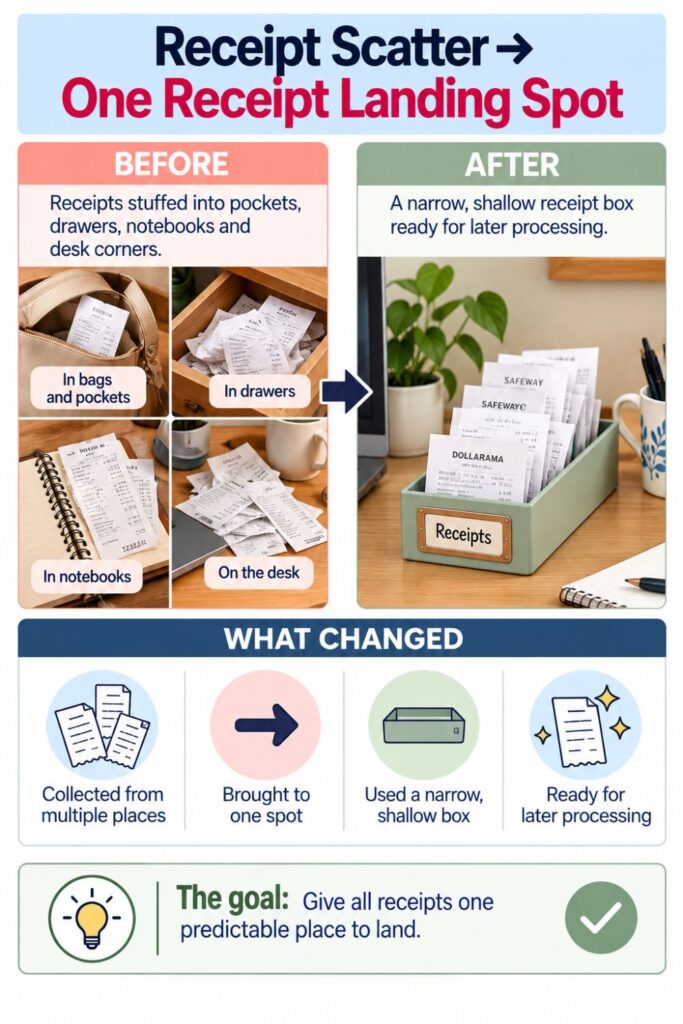
Avoid adding extra organization inside the containers.
You probably do not need envelopes, clips, folders, chronological stacks, or subcategories within each box.
Let the container do the organizing: The fact that every paper in the Receipts box is a receipt is already enough structure for temporary storage.
Resist creating a system inside the system: Additional steps make it more likely that you will stop using the inbox when you are rushed.
The daily routine should be almost boring in its simplicity.
Paper arrives.
You identify its category.
If you want to get more from your life, and are looking for concrete action steps to get you there, check out our Request a Coach page. It’s a “cut the fence-sitting and take action” way to tackle your issues and actually find success. To get off the fence and start to take action, click or tap here.
You drop it in.
Then you return to what you were doing.
That small habit prevents the desk from becoming the default holding area for every unfinished paper decision.
Processing comes later. Containing happens now.
7. Empty the Boxes With a Simple Paper-Processing Routine
A paper inbox only works if papers eventually leave it.
Otherwise, you have not really eliminated clutter. You have simply moved the clutter into three containers.
Choose a regular time to process the boxes. This could be at the end of the workweek, during Sunday planning, before paying bills, or whenever you already review administrative tasks.
You do not need to process every box every day.
If you want to get more from your life, and are looking for concrete action steps to get you there, check out our Request a Coach page. It’s a “cut the fence-sitting and take action” way to tackle your issues and actually find success. To get off the fence and start to take action, click or tap here.
Choose a realistic review rhythm: Once or twice a week may be enough for a typical household or home office.
Process one container at a time: Mixing receipts, notes, and action papers together recreates the exact decision overload the boxes were designed to prevent.
Start with Receipts.
Enter expenses, photograph receipts you need digitally, submit reimbursements, move important records to permanent storage, and discard anything no longer needed.
Then handle Notes.
Transfer appointments, ideas, reminders, phone numbers, or other information into the system where they actually belong. Once the information is safely stored, get rid of the scrap paper.
Finally, work through To Do.
For each paper, decide whether you can complete the task now, schedule it, delegate it, file it, or discard it.
If you want to get more from your life, and are looking for concrete action steps to get you there, check out our Request a Coach page. It’s a “cut the fence-sitting and take action” way to tackle your issues and actually find success. To get off the fence and start to take action, click or tap here.
A useful processing sequence is:
- Do it: Complete a quick action immediately.
- Schedule it: Put longer tasks on your calendar or task list.
- Transfer it: Move information somewhere permanent.
- File it: Store documents that truly need long-term retention.
- Discard it: Recycle or shred papers that no longer serve a purpose.
Try not to return a paper to the box without knowing why it is still there.
Give unfinished papers a specific next step: “Call insurance Tuesday” is better than simply putting the form back.
Clear completed papers immediately: Once the reason for keeping the paper disappears, the paper should usually disappear from your desk system too.
The goal is not perfectly empty containers.
The goal is movement.
Papers arrive, wait briefly, receive a decision, and leave.
That flow is what prevents a small-box system from turning into three neatly labeled piles of procrastination.
If you want to get more from your life, and are looking for concrete action steps to get you there, check out our Request a Coach page. It’s a “cut the fence-sitting and take action” way to tackle your issues and actually find success. To get off the fence and start to take action, click or tap here.
8. Use the Box Size as a Built-In Clutter Limit
Small containers have an advantage that larger filing systems do not.
They fill up.
That might sound inconvenient, but it can actually protect your desk from months of accumulated paper.
A nearly full container gives you a visible signal that the system needs attention.
Treat a full box as a reminder, not a storage problem: Before looking for a larger container, process some of what is already inside.
Avoid creating an overflow pile: Once papers start collecting beside the box, the old clutter habit has returned.
This is why choosing relatively small containers matters.
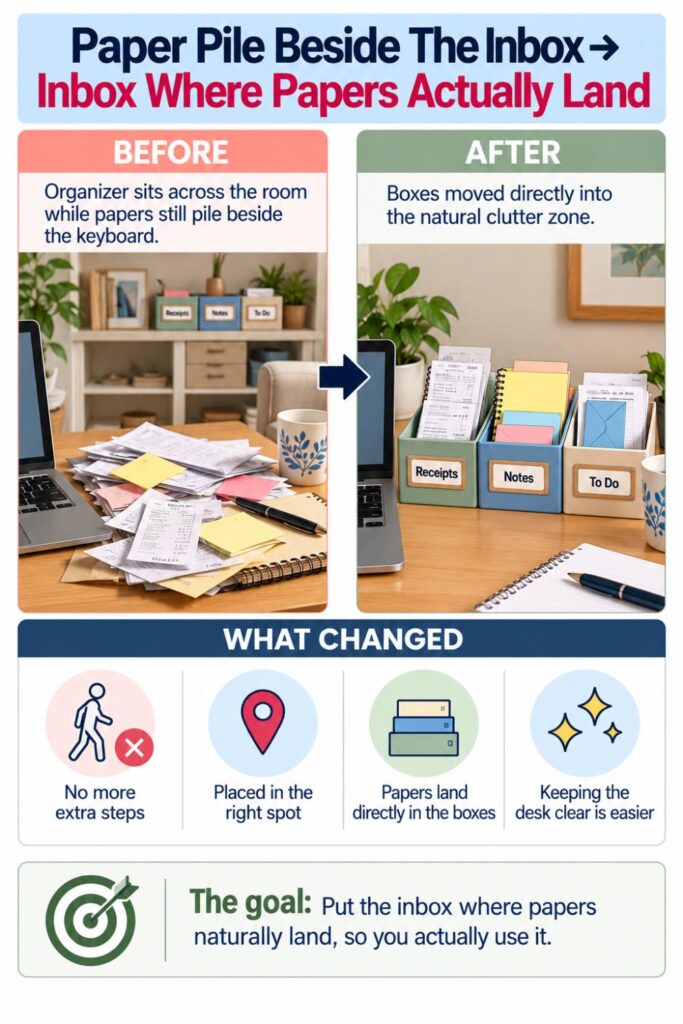
A giant storage bin can hide a problem for months. A shallow box makes accumulation obvious.
If you want to get more from your life, and are looking for concrete action steps to get you there, check out our Request a Coach page. It’s a “cut the fence-sitting and take action” way to tackle your issues and actually find success. To get off the fence and start to take action, click or tap here.
Pay attention to which container reaches its limit first.
If the Receipts box fills every few days, perhaps receipts need a more frequent processing routine. If the Notes box is constantly overflowing, you may be writing information down without transferring it to a planner, notebook, or digital system.
A packed To-Do box can reveal something different.
It may mean you have more unfinished actions than your current routine can handle.
Use overflow as information: A crowded container tells you something about your workflow, not just your storage capacity.
Fix the bottleneck before increasing storage: Ask what is preventing those papers from moving to their next destination.
Sometimes the solution will genuinely be a slightly larger box. A person who handles dozens of business receipts each week may naturally need more capacity than someone who receives two.
But increase the container size intentionally.
If you want to get more from your life, and are looking for concrete action steps to get you there, check out our Request a Coach page. It’s a “cut the fence-sitting and take action” way to tackle your issues and actually find success. To get off the fence and start to take action, click or tap here.
Do not automatically assume more storage equals better organization.
You can also create a simple threshold such as “process the box when it reaches two-thirds full.” This keeps the papers visible enough to remind you without allowing the container to become packed.
The physical limit becomes part of the system.
Instead of relying entirely on memory to tell you when paperwork needs attention, the boxes themselves provide the cue.
When the space starts disappearing, it is time to make decisions.
9. What to Do When the System Starts Getting Messy Again
Even a good organization system can drift.
Maybe papers start collecting beside the boxes again. Perhaps one container becomes stuffed while another sits empty. You might even realize that you keep ignoring the entire setup.
That does not automatically mean the system failed.
If you want to get more from your life, and are looking for concrete action steps to get you there, check out our Request a Coach page. It’s a “cut the fence-sitting and take action” way to tackle your issues and actually find success. To get off the fence and start to take action, click or tap here.
It usually means something about your habits, workload, or workspace changed.
Start by looking at where the new paper pile is forming.
Follow the clutter trail: If papers consistently accumulate somewhere other than the inbox, consider moving the boxes closer to that location.
Check whether the containers are still convenient: A new monitor, notebook, lamp, or work setup may have made the original location awkward.
Next, examine the categories.
Perhaps “Notes” has become a catchall for everything you do not know how to handle. Maybe almost every paper in the Receipts box is actually waiting for reimbursement.
If so, change the categories.
You could replace Receipts with “Reimburse” if that better describes what those papers need.
If you want to get more from your life, and are looking for concrete action steps to get you there, check out our Request a Coach page. It’s a “cut the fence-sitting and take action” way to tackle your issues and actually find success. To get off the fence and start to take action, click or tap here.
Split only categories that genuinely need splitting: Do not create five new boxes just because one category became slightly messy.
Remove categories that are not being used: An empty container is a clue that the category may not deserve permanent desk space.
Sometimes the system simply needs a reset.
Take ten or fifteen minutes and empty each box completely. Process obvious trash, transfer information, complete quick actions, and return only papers that genuinely still need attention.
Then wipe the area and put the boxes back.
The key is to reset the system instead of endlessly redesigning it.
Buying new organizers can feel productive, but the problem may not be the containers at all. The issue may be an unclear label, inconvenient placement, or a processing routine that stopped happening.
Your inbox should remain flexible.
If you want to get more from your life, and are looking for concrete action steps to get you there, check out our Request a Coach page. It’s a “cut the fence-sitting and take action” way to tackle your issues and actually find success. To get off the fence and start to take action, click or tap here.
If changing one label or moving the boxes six inches makes the habit easier again, make the change.
The best organization system is not the one that stays exactly the same forever. It is the one that remains easy enough to keep using.
10. How an Organizing Coach Might Simplify Your Paper Habit
If paper clutter keeps returning even after you create a simple inbox, the interesting question becomes where does the routine break down?
That is the kind of question an organizing coach may help you explore.
The problem might not actually be paper.
Maybe you hesitate to throw anything away because you worry you will need it later. Maybe your To-Do box fills because you have not decided when administrative tasks will happen. Perhaps your desk is where every household member leaves things for you.
A coach can help identify the pattern behind the pile.
Look for the exact point where the process stops: Do papers fail to reach the boxes, or do they reach the boxes and never leave?
If you want to get more from your life, and are looking for concrete action steps to get you there, check out our Request a Coach page. It’s a “cut the fence-sitting and take action” way to tackle your issues and actually find success. To get off the fence and start to take action, click or tap here.
Separate storage problems from action problems: A crowded To-Do box may need better task planning rather than another organizer.
A coach might also look at how much friction exists in your current system.
If dealing with a receipt requires opening an app, logging into an account, finding a spreadsheet, scanning the receipt, renaming the file, and entering six pieces of information, it is understandable that receipts accumulate.
You may need to simplify the workflow.
Remove unnecessary steps: Keep only the actions that genuinely matter for your household or work.
Build the routine around existing habits: Process your boxes during something you already do regularly, such as weekly planning or Friday desk cleanup.
Accountability can help too.
You might decide that every Friday afternoon you will clear the boxes before finishing work. The routine does not need to be dramatic. It simply needs to happen often enough that papers keep moving.
If you want to get more from your life, and are looking for concrete action steps to get you there, check out our Request a Coach page. It’s a “cut the fence-sitting and take action” way to tackle your issues and actually find success. To get off the fence and start to take action, click or tap here.
An organizing coach may also help you notice when you are designing systems for an imaginary version of yourself.
Perhaps that imaginary person scans every receipt immediately and maintains perfectly labeled files.
Your real system might be much simpler, and that is fine.
The objective is not to become someone who loves paperwork.
It is to create a paper workflow that requires so little effort that you can realistically maintain it.
A Clear Landing Spot Changes the Whole Desk
Loose-paper clutter is often less about having too much paper and more about having too many unfinished decisions.
A receipt is waiting to be recorded. A note is waiting to be transferred. A form is waiting to be completed. Until those decisions happen, the papers need somewhere to exist.
That is the role of the small-box inbox.
If you want to get more from your life, and are looking for concrete action steps to get you there, check out our Request a Coach page. It’s a “cut the fence-sitting and take action” way to tackle your issues and actually find success. To get off the fence and start to take action, click or tap here.
It creates a simple middle step between “this paper just entered my life” and “this paper has been fully dealt with.”
You do not need to finish every paper task immediately.
You only need to know where the paper goes next.
A basic system can remain surprisingly small:
- Receipts wait together.
- Notes wait together.
- To-do papers wait together.
- Each box gets processed regularly.
- Finished papers leave the system.
Keep the first action easy: Dropping a paper into the correct box should take only a few seconds.
Keep temporary storage temporary: Review the containers often enough that papers continue moving instead of settling permanently.
Change the system when your habits change: Move the boxes, rename categories, or remove a container when doing so makes the routine easier.
Most importantly, do not judge the system by whether the boxes are always empty.
If you want to get more from your life, and are looking for concrete action steps to get you there, check out our Request a Coach page. It’s a “cut the fence-sitting and take action” way to tackle your issues and actually find success. To get off the fence and start to take action, click or tap here.
An empty inbox is not the real goal.
A useful desk is.
If you can sit down to work without moving receipts, hunting for a handwritten reminder, or wondering whether an important form disappeared underneath something, the system is doing its job.
Those few small boxes create boundaries around unfinished paper.
Instead of every loose document claiming part of your desktop, each one gets a temporary home and a clear next step.
That is a small organizational change, but it can dramatically change how the desk feels.
You are no longer relying on random piles to remember what still needs attention.
You have a simple place for the paper to wait, and a simple process for moving it forward.
If you want to get more from your life, and are looking for concrete action steps to get you there, check out our Request a Coach page. It’s a “cut the fence-sitting and take action” way to tackle your issues and actually find success. To get off the fence and start to take action, click or tap here.
If you want to get more from your life, and are looking for concrete action steps to get you there, check out our Request a Coach page. It’s a “cut the fence-sitting and take action” way to tackle your issues and actually find success. To get off the fence and start to take action, click or tap here.
Read this next

DIY Closet Drawer Ideas for Clothes, Accessories, and Small Items
Tiny closet driving you crazy? These simple drawer, bin, and shelf fixes make clothes and accessories easier to find fast.
Read More
Clearing Out Your Life’s Clutter
Are you overwhelmed and stressed out because of all the clutter in your life?
Read More
DIY Desk Organizer Ideas Using Things You Already Have
Use jars, boxes, trays, clips, and simple containers to create useful desk storage without buying a whole new setup. You know that annoying moment when you decide your desk needs […]
Read More